Batch Product Update
 ChatGPT
 Claude.ai
With ConnectProf, you can update your products transferred to the marketplace in bulk instead of updating them manually one by one.
For the bulk update process, click on "Product List" from the admin panel.
The product list will open.
Filter your products transferred to the marketplace or select the products you want to update among the products transferred to the marketplace.
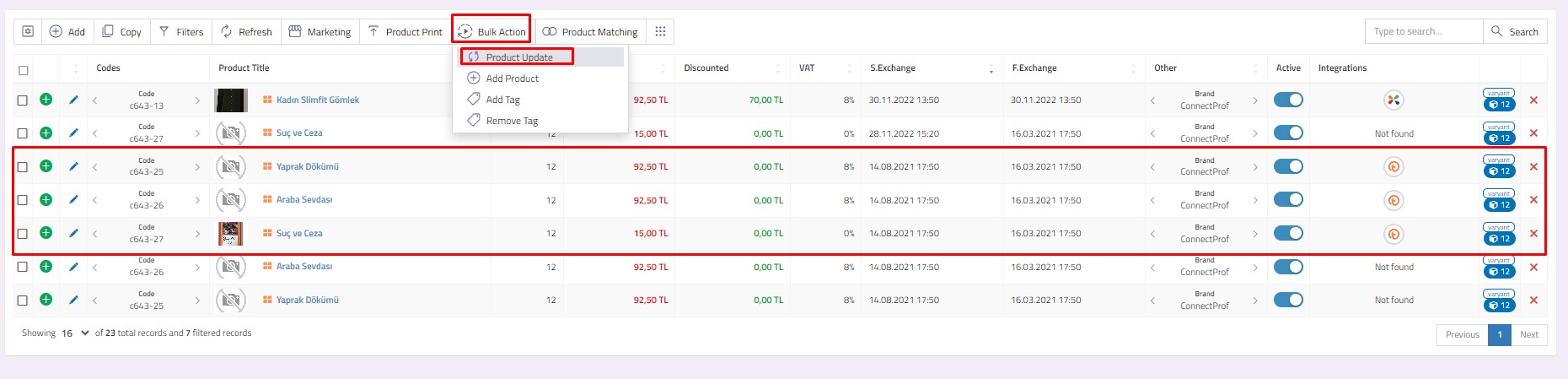
After the selection is made, click on the "Bulk Product Update" button.
Marketplaces will appear in the window that opens. Select which marketplace you want to update your products to.
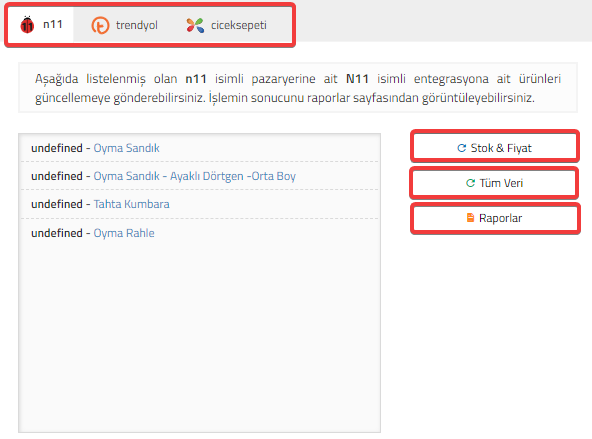
Stock & Price : If you want to update only the stock and prices of your products, you can update them by clicking the "Stock & Price" button.
All Data : If you want to update all data such as image, description, title of your product, you can update it by clicking the "All Data" button.
Reports : After the update is completed, you can review the product-based reports from the reports area.
Click here to get detailed information about the single product update report.
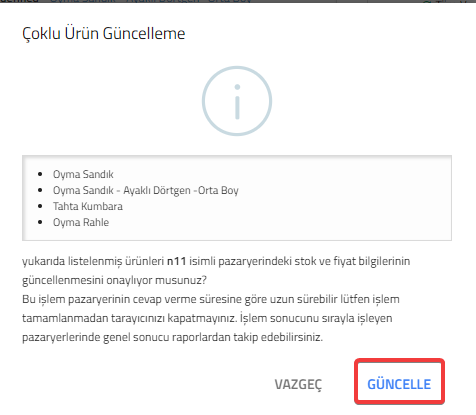
After reading the warning message, click the "Update" button.
Do not close your browser during the process.
The update process will be completed.
