Connectprof Order Integration Editing - Statuses
 ChatGPT
 Claude.ai
With ConnectProf, you can automatically reflect your order processes to the admin panel.
Order processes may differ according to each marketplace.
You can provide the installation by matching the marketplace order processes with your own order processes.
You can transfer orders from the integration you choose to your e-commerce site and provide bidirectional management.
NOTE : You can do this if you are using T-Soft infrastructure.
To map your order processes, click on Admin Panel > Orders > Integration List button.
Select the marketplace you want to make changes and open the edit window.
In the window that opens, click on the "Statuses" field.
Marketplace order processes will be listed.
When you want to change the order processes for Trendyol, there will be many order processes such as waiting for payment, order confirmation, order created, supplying, invoiced, cargo ready, shipped.
You need to map all of these processes.
When mapping the processes, you can ask the question "How should the processes in the States field be reflected in my e-commerce site?".
For example, "How should the order from the marketplace in the status of "Cancelled" be reflected on my e-commerce site?" By asking the question, you can select the answer and perform mapping processing.
You can also map the "Cancelled" process from the marketplace as "Cancelled" when transferring it to the t-soft panel.
NOTE : If the equivalent of the marketplace order processes are not available in your Tsoft panel while mapping, you can add them from Orders > Order Processes.
For detailed information about adding an order process, you can review the "Adding an Order Process" article. Click here to access the article.
NOTE : The order processes in the statuses field are the processes submitted by the marketplaces. No addition or subtraction can be made from this field.
You can get information from the marketplace about the details or equivalents of the processes coming from the marketplace.
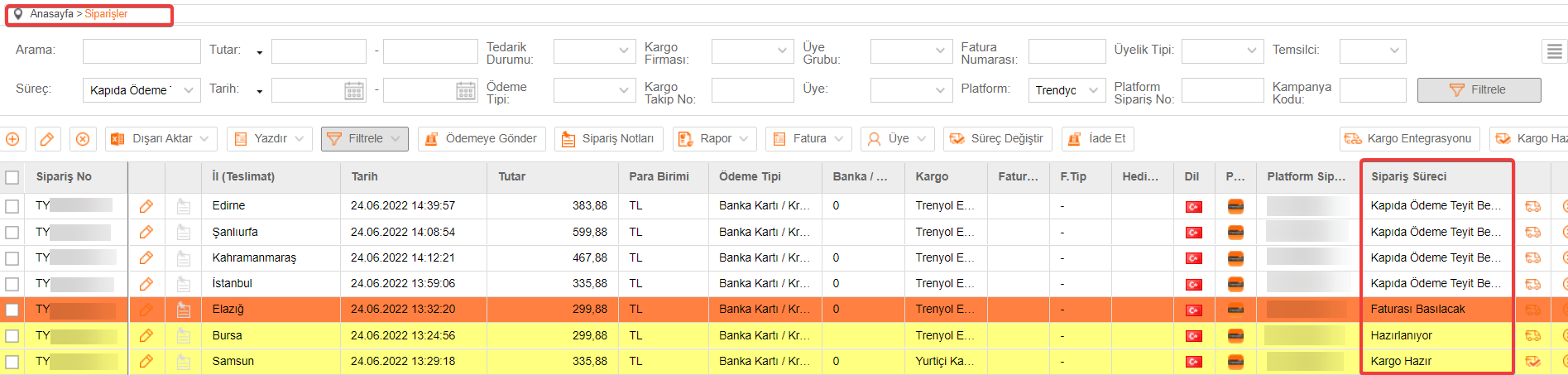
As the order processes are mapped, the mapped process comes when transferring the order to the e-commerce site.
Order Processes View in T-Soft Management Panel: