Connectprof Trendyol Integration
 ChatGPT
 Claude.ai
A marketplace refers to a trading model where various sellers can offer their products or services under the same roof, usually through online platforms.
Marketplaces are home to a significant demand for virtual shopping, with millions of customer visits and clicks daily.
Through marketplaces, you can reach a wider audience and sell on your e-commerce site. This allows you to increase brand awareness, gain loyal customers and drive traffic to your e-commerce site.
ConnectProf makes it easy to transfer your products to various marketplaces via API or XML.
Trendyol, one of Turkey's leading e-commerce platforms, offers significant potential for many businesses. However, it is of great importance for businesses that want to sell on Trendyol to manage their stores effectively and track orders efficiently. ConnectProf plays a very important role in Trendyol integration at this point.
ConnectProf is an integration platform that helps e-commerce businesses manage Trendyol stores and synchronize data. With Trendyol integration, businesses can automatically synchronize store stocks and product information via ConnectProf. This allows businesses to keep their inventories up to date and provide accurate and up-to-date information to customers.
Orders from Trendyol can be easily managed through ConnectProf. Orders are automatically synchronized and quickly displayed to businesses, making processes more efficient.
Certain steps must be followed to set up the Trendyol integration with ConnectProf.
First of all, you must have a Trendyol Seller Account.
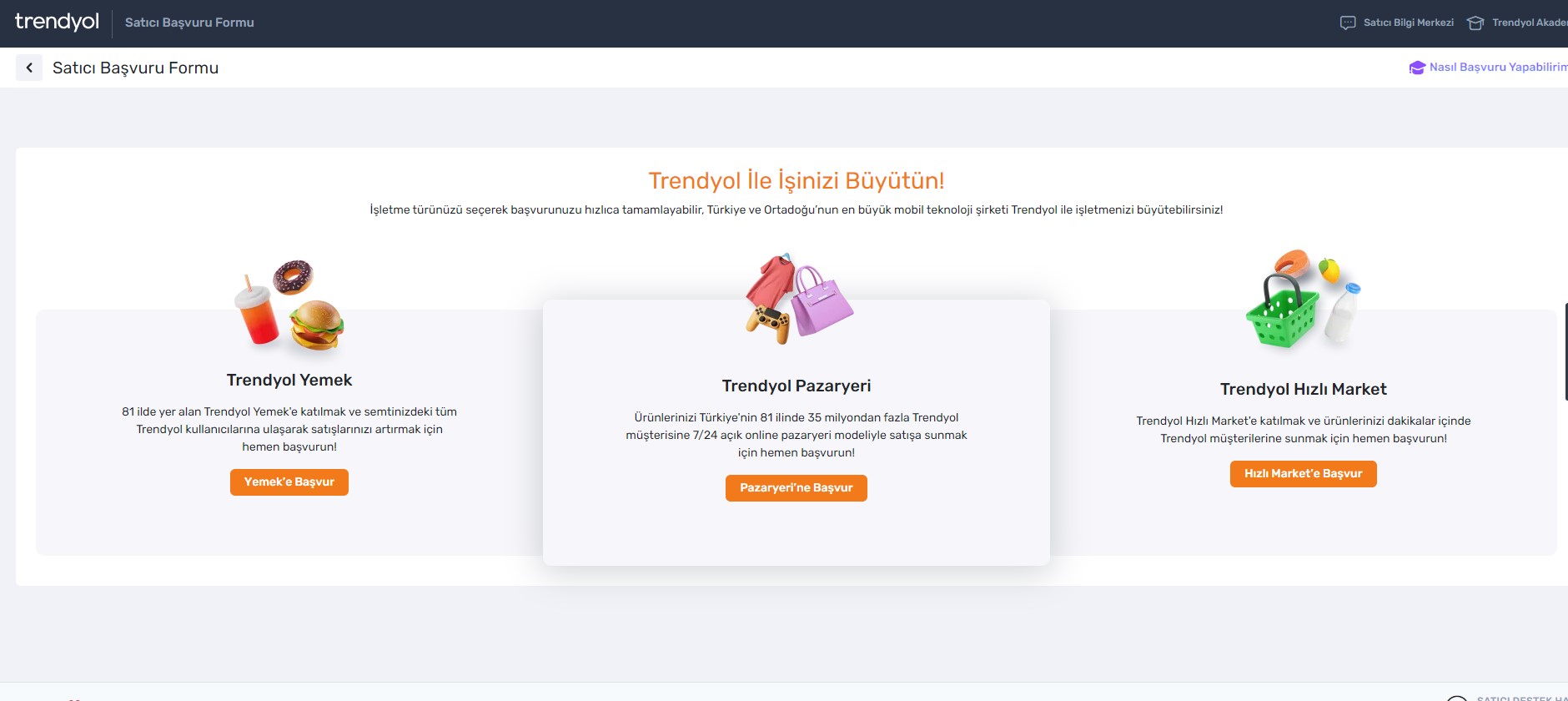
Being a seller in Trendyol has various advantages.
- You gain access to a wide audience.
- No need to work to build your customer base; Trendyol's existing customer base is yours.
- You can sell without geographical restrictions.
- There are no limitations on your product catalog and the categories you can sell in; it offers more exposure and sales opportunities than a physical store.
- You don't need an office or a big team to sell on Trendyol. You cooperate with a professional team in technical infrastructure, customer service, payment systems, etc.
- You increase brand visibility by being on the homepage of millions of customers.
- You can increase your sales by participating in the biggest campaign periods of the year.
- Customers make their purchasing decisions on Trendyol with confidence, knowing that their basic rights such as shipping, returns and data protection are guaranteed.
- By using secure payment methods such as 3D Secure and Trendyol Wallet, concerns about the security of your virtual store are eliminated.
You can apply to become a Trendyol seller by filling out the form by clicking the "Sell on Trendyol" button in the upper right corner of the rendyol website.
Some procedures must be completed before uploading products to Trendyol.
1. **Authenticity Check:**
- Please upload the current documents requested for your products to be listed on Trendyol from the "Product > Document Transactions" screen on Trendyol Seller Panel.
2. **Brand Registration Process:**
- In order for Trendyol to register a trademark, you must have a registered trademark. After obtaining the trademark certificate, you can perform the trademark registration process from the "Product > Document Transactions" page in the seller panel.
3. **PSF Overline Price Application:**
- If the discounted price you set for a product is lower than the lowest price of the last 30 days, the strikethrough price display will be automatically reflected on the product screen.
4. **Reasons for Product Returns:**
- Your products go through the approval process after the product upload process. Reasons for product rejection include logo or text issues, incorrect or inactive branding, missing or incorrect category information, undefined size specifications, missing size, measurements or package content, and more.
After creating a Trendyol seller account, you can connect your Trendyol stores to ConnectProf using Trendyol API services for tasks such as product transfer, stock and price updates, order processes, invoice sending.
ConnectProf is a platform that enables companies selling in the digital environment to manage their products, orders and advertisements from a single panel.
Actions that can be performed with ConnectProf:
- Product Transfer
- Product Update
- Stock & Price Update
- Receiving Order
- Order Status
Change - Order Cancellation
- Cargo Integration
- Cargo Tracking Code Notification
- Invoice Entry
- Receiving Return Orders
You need certain information to connect your Trendyol account to ConnectProf.
- **Account Connections:**
- In order to transfer your ConnectProf products to Trendyol and actively sell them, you must first make an account connection.
- Click on "My Accounts" and then click on "Add New Account (+)" button. Select the account type as "Trendyol" and click "Continue".
- Enter your Trendyol API information and click "Continue".
- It will lead to the test result.
- If the test result is successful, it will switch to the marketplace type and test the correctness of the added API information. If it is correct,
You can now proceed to the product transfer process.
2. **Product Transfer:**
- In the product transfer process, you can transfer and update products from ConnectProf to Trendyol.
- Select the products you want to transfer and then click the "Transfer Product" button.
- You can track the status of your product transfer transactions on the "Product Transfer Logs" page.
- Products must be transferred successfully in order to be active on Trendyol.
3. **Stock & Price Update:**
- You can update the stock and price information of your products on Trendyol via ConnectProf.
- Select the products you want to update on the "Stock & Price Update" page and click the "Stock & Price Update" button.
- The stock and price changes you will make via ConnectProf will be reflected on Trendyol.
4. **Taking Orders:**
- Orders placed to Trendyol are automatically received by ConnectProf.
- You can view and manage these orders on the "Orders" page.
- Order information including products, quantities, prices and customer details are synchronized.
5. **Order Status Change:**
- You can change the status of orders received from Trendyol via ConnectProf.
- On the "Orders" page, select the order you want to update, change its status and click "Update Status".
- The updated order status will be reflected in Trendyol.
6. **Order Cancellation:**
- You can cancel your orders on Trendyol via ConnectProf.
- Select the order you want to cancel on the "Orders" page, click "Cancel Order" and confirm the cancellation.
- The canceled order information will be reflected on Trendyol.
7. **Cargo Integration:**
- ConnectProf allows integration with cargo companies to effectively manage cargo processes.
- You can set the cargo integration from the "Cargo Companies" page and manage the cargo process smoothly.
8. **Cargo Tracking Code Notification:**
- After shipping the products, you can notify your customers of the tracking code via ConnectProf.
- Select the order on the "Orders" page, click "Notify Tracking Code" and enter the tracking code.
- A tracking code notification will be sent to the customer.
9. **Sending Invoices:**
- You can send the invoices of your orders via ConnectProf.
- Select the order on the "Orders" page, click "Send Invoice" and provide the required invoice details.
- Invoice submission will be reflected to Trendyol.
10. **Retrieval of Return Orders:**
- Return orders from Trendyol are automatically received by ConnectProf.
- You can manage return orders from the "Returns" page and take action accordingly.
In summary, ConnectProf simplifies and streamlines the integration process between your e-commerce business and Trendyol, allowing efficient management of products, orders and other important tasks. By following the necessary steps and taking advantage of the features offered by ConnectProf, you can strengthen your presence on Trendyol and take advantage of the opportunities it offers to grow your business in the online market.
