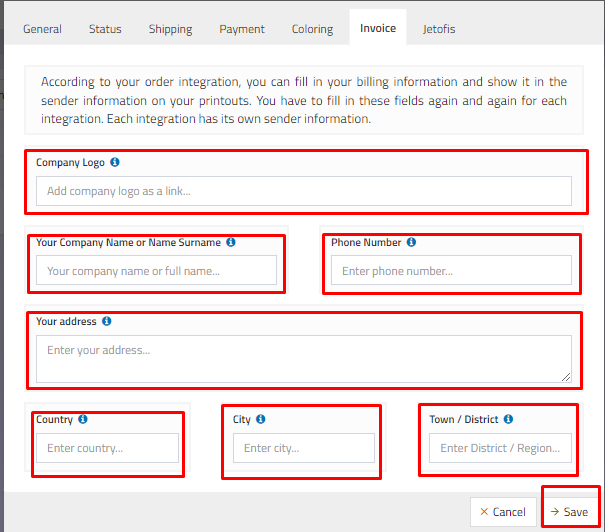
Edit Order Integration - Invoice
 ChatGPT
 Claude.ai
ConnectProf gathers your orders from the marketplace on a single panel for ease of use. In addition, it provides convenience in invoice transactions by integrating with the accounting programme in its own infrastructure without the need to pay fees to different accounting programmes.
You can fill in your invoice information according to your order integration and show it in the sender information in your printouts.
To add your invoice settings, select the marketplace you want to add invoice information from the Orders > Integration List area and click "Edit" and then click the "Invoice" button from the window that opens.
The window will open where you can add your invoice settings.
NOTE : You need to fill these fields repeatedly for each integration. Each integration has its own sender information.
- Company logo: You can add the company logo as a link.
- Your company name or surname: You can add your company name or personal name and surname information.
- Telephone Number : Add phone number information.
- Address Information : Please add your address information.
- Country / City / District - Region : You can add your country, city, district and region information to the fields.
After adding all your information, click the "Save" button.
NOTE : The information you have added will appear in the invoice sender information.