Export - Special Conditions
 ChatGPT
 Claude.ai
Certainly, here is the English translation of the provided text:
"You can make specific definitions such as desi-based shipping fee, desi-based commission, country-based shipping fee, country-based commission, color matching, and size matching from the Special Terms section in ConnectProf.
NOTE: This page is still in development. Even if the settings you make are saved, they do not yet have any impact on integrations. If there is a setting you want to use, you can add it now and leave it ready for use with the upcoming development.
To access the Special Terms page, click on the Export List page in the admin panel.
Select the marketplace you want to operate on and click on the Options button > Special Terms section.
Desi-Based Shipping Fee
You can add a shipping fee based on the value in the Desi field found in the details of the products. If there is a general shipping fee in your integration settings and no custom shipping fee entered in the options section, the value in the matched field will be sent here.
For example; if the Desi Value of the product = 1.5, and the Desi-Based Shipping Matching is 1.5 desi = 10, then the shipping fee will be reflected as 10 TL.
NOTE: Your desi values must be exact values. They must be whole or 0.5 times numbers. Numbers in between will not be processed. It does not work as an interval.
After adding your information, click the "Save Conditions" button.
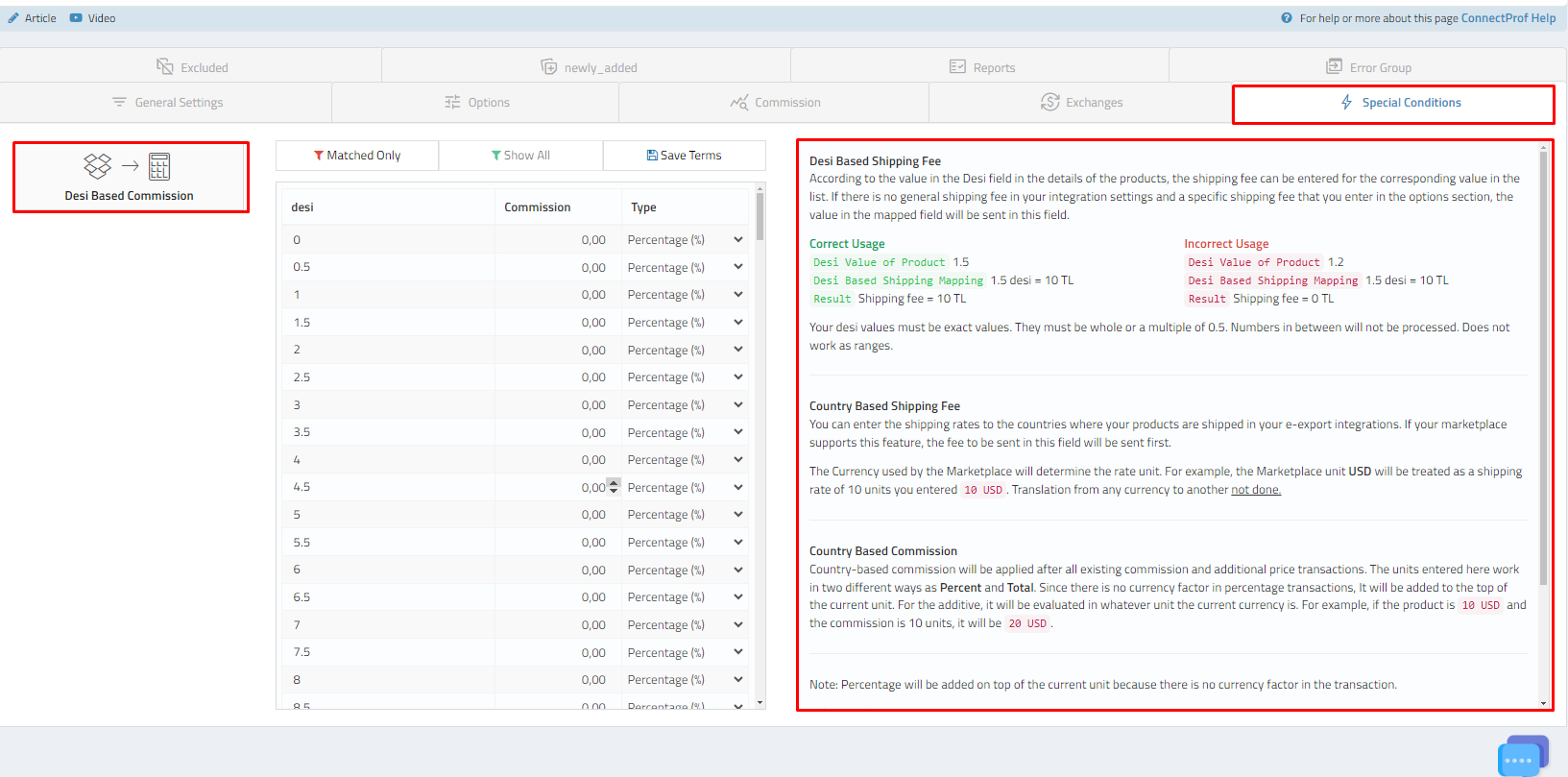
Desi-Based Commission
You can add a percentage or total commission based on the values in your Desi field in the product details. The added commissions must be whole or 0.5 times numbers. Numbers in between will not be processed.
After adding your information, click the "Save Conditions" button.
Country-Based Shipping Fee
You can enter shipping fees for countries where your products are sent in your e-export integrations. If your marketplace supports this feature, the fee sent in this area will be prioritized.
The currency unit used on the marketplace will determine the fee unit.
For example; if the Marketplace unit is USD and you added a 10-unit shipping fee, it will be considered as 10 USD. Conversion is not made to any other currency.
After adding your information, click the "Save Conditions" button.
Country-Based Commission
Country-based commission will be applied after all existing commission and additional price transactions. The units entered here work in two different ways: Percentage and Total. In the percentage operation, since there is no currency factor, it will be added on top of the current unit. For the total one, it will be evaluated based on the current currency unit.
For example; if the product is 10 USD and the commission is 10 units, it will be 20 USD.
After adding your information, click the "Save Conditions" button.
Color matching is only used in e-export integrations. It is used when selecting the equivalents of existing colors in English or other languages and sending them in the process. This feature does not work in domestic marketplaces.
For example; you can match the color "Red" from your existing colors to the corresponding "Red" color in the table.
After adding your information, click the "Save Conditions" button.
Size Matching
If the size information on your e-commerce site is not compatible with marketplace standards, your products will encounter errors. Therefore, you can match the size information on your site with marketplace size information in the size matching section.
For example; if the "XS" size on your site matches the "S" size on the marketplace, you can match XS size with S size.
After adding your information, click the "Save Conditions" button."