How is product addition performed with Connectrprof API?
 ChatGPT
 Claude.ai
If you are using T-Soft e-commerce methods, you can transfer your products to the ConnectProf management panel via API.
All products updated on your e-commerce website will also be updated in the ConnectProf panel simultaneously.
You can integrate the transferred products to all domestic and international marketplaces such as Trendyol, n11, Hepsiburada, GittiGidiyor, ÇiçekSepeti, AliExpress, Amazon, etc., and send and update product information such as different titles, prices, stock, and descriptions individually or in bulk.
There are some procedures that need to be done before transferring your products.
Click on Catalog Settings > Field Management in the management panel.
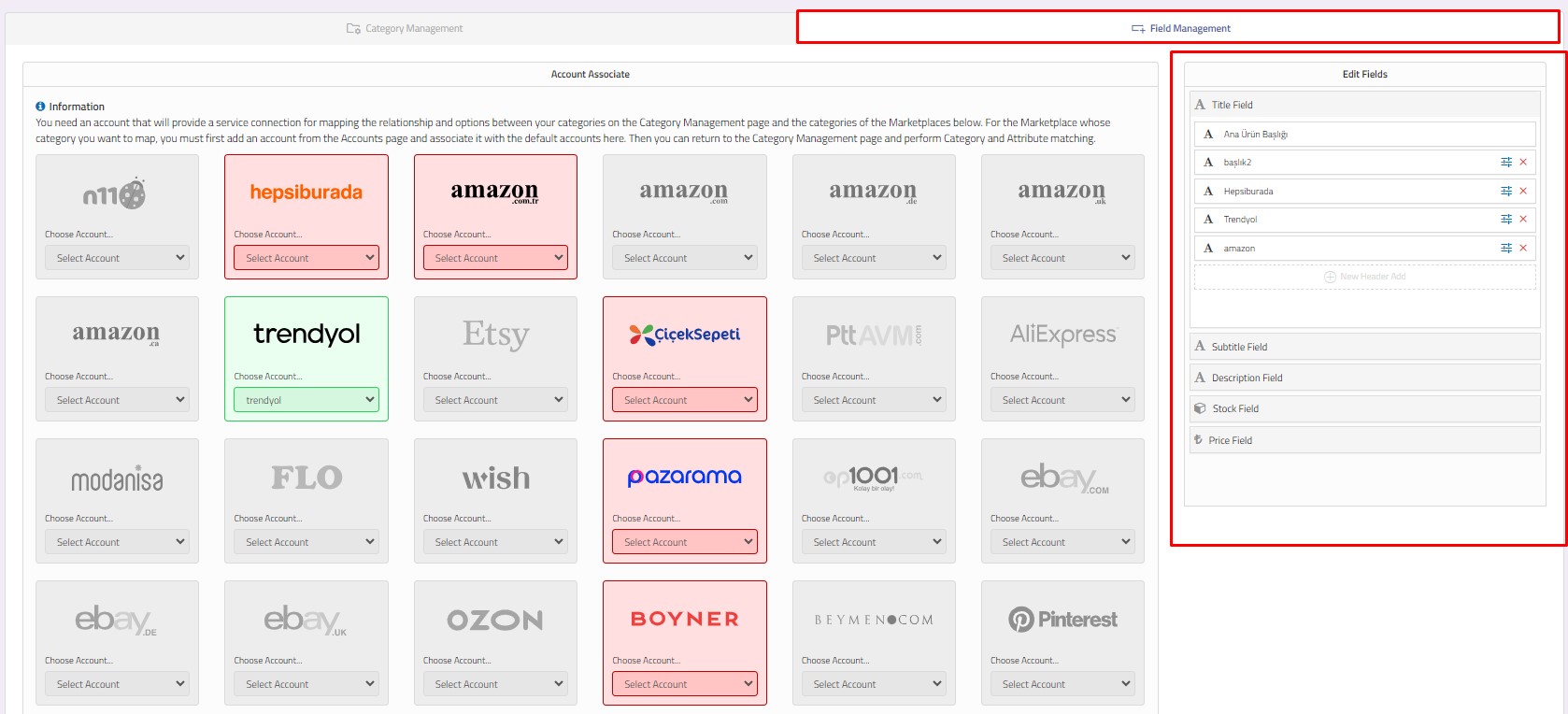
Different fields such as title, subtitle, description, stock, and price can be created from the Field Management section.
To create a new price field, click on the "Add New Price" button in the field management section.
For more detailed information about field management, click here.
Product Transfer via API
You can transfer your products to ConnectProf using the API method. You can then offer your products for sale on various marketplaces through ConnectProf.
To import products via API, click on Products > Menu > Import button. Alternatively, you can click on the Import section on the homepage of the management panel, which will redirect you to the import page.
For detailed information about the import page, click here.
To transfer your products to the ConnectProf panel, click on the "Create New Integration" button on the import page.
The page displays a list of integrations. You can view editing, options, and reports of the relevant integration from the hamburger menu.
